


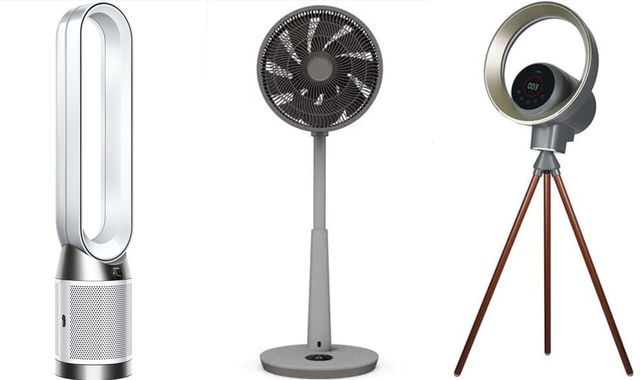
A scorching bank holiday, and more sweltering weather forecast this week, has likely got many Britons thinking of investing in a new fan.
Deals are much harder to find once temperatures rise, and with some models stretching into many hundreds of pounds, it's important to do your research.
We've spoken to experts on what you should be looking for...
Do fans actually cool a room?
No. They move air around - but that does make a difference.
"Moving air helps your body cool down through sweat evaporation," says Joanna O'Loan, knowledge manager at Energy Saving Trust.
"This can help you feel cooler even if the actual room temperature doesn't drop."
And remember, shutting out the sunlight by closing blinds or curtains during the hottest parts of the day will go a long way in keeping indoor temperatures lower.
Which type of fan is right for you?
There are a few different options when it comes to electric fans for your home.
The ones you will be most familiar with are desk fans, which are compact and designed to sit on a table top.
There are also pedestal fans, which look very similar but have a taller base.
Tower fans are similar to a pedestal fan but are less visually intrusive.
Natalie Hitchins, head of home products and services at Which?, says one of the biggest mistakes you can make is getting a fan that's not big enough for your space:
"A desk fan will only work well to cover small areas so would be suitable for a small bedroom or a home office, whereas a pedestal fan or a tower fan would be more suitable if you are trying to cover a larger area like a living room or larger bedroom."
Key specs
You may want to focus on how many speed settings a fan has and compare the RPM (revolutions per minute) of models.
But airflow, or how much air a fan moves, is also crucial. This is measured in CFM (cubic feet per minute).
The higher the number, the stronger the airflow.
Argos guidance is that:
- Desk fans typically range from 200-400 CFM;
- Pedestal and floor fans might deliver 1,000-2,500 CFM;
- Tower fans tend to fall somewhere in between, offering a steady breeze with a smaller footprint.
If you're trying to cool an entire room, look for a fan with a higher airflow rating.
Often tied to both the above is noise - and only you can decide where the balance lies for you.
"Noise level is especially important as a fan that's fine for the living room might be too loud to use while you sleep," says Will Jones from Currys.
He notes that bladeless models offer noticeably smoother airflow and quieter operation.
Ideally, a fan will be quieter than 50db, he says.
But he says the quietest models can go far lower, with the Duux Whisper Flex, for example, running at just 13dB, only slightly louder than normal breathing (around 10dB).
Oscillation and tilt functions help to distribute air more evenly across the room - though if you are alone and want immediate cooling, stationary may be better.
Another spec that comes down to personal preference is maintenance.
Fans gather dust when not in use, which will get blown around the room when you switch them on and can also reduce airflow.
For those keen to avoid extra work, Jones again recommends bladeless fans, which tend to be more expensive but only need a quick wipe, with no grills or blades to dismantle.
Can there be safety or health issues from running a fan?
Dust is one, but not the only, health issue you should also be paying attention to.
According to experts at Sleep Advisor, moving dry air around the room "causes flurries of dust and pollen to make their way into your sinuses", causing problems for those with asthma or allergies.
Constantly blasting air into our faces, fans can also cause sore throats, dry eyes and dry skin.
If you leave them running at night, fans may block your sinuses due to your body trying to compensate for the lack of mucus, which could lead to stuffiness and headaches.
While some of these are positioning and maintenance issues, buying the right model can also help, says Jones.
"The Dyson TP11 Air Cooling Purifier captures 99.95% of particles as small as 0.1 microns, including allergens and odours, coming in handy during sniffle season," he says.
The Vybra Halo fan is recommended for people with allergies.
He also points to the Vybra Halo VSOO1H - which has settings that can get rid of nasty smells and germs - and the Philips 8000 series.
The latter includes a purifier that is adjusted according to real-time air quality checks and can filter out particles down to 0.003 microns.
However, it's worth noting that all three models are pricier, coming in at over £100.
How much should you spend on a decent fan?
Potential health issues aside, Which? testing shows that spending a bit more - around £100 - can pay off as it will get you a really good fan.
"Generally speaking, [such fans] are quieter, create a more consistent airflow and have a wider range of wind speeds," Hitchins says.
Even fans in the £50 to £100 range give a noticeable boost in performance, according to Jones.
That doesn't necessarily mean you need to splash out on the priciest models to get a bit of heat relief.
"Fans costing less than £50 didn't perform as well in our tests, but most will still do an adequate job," Hitchins says.
How much does it cost to run a fan per hour?
Contrary to what some may assume, fans are a surprisingly energy-efficient and cheap appliance, making running costs almost negligible.
"Most cost only a few pence per hour to run, so even with regular use on hot days, they're one of the cheapest ways to stay comfortable," says O'Loans of the Energy Saving Trust.
This is mostly independent of the type of fan you buy: a typical tower, desktop or pedestal fan costs around 15p to 31p to run for 24 hours, according to the Energy Saving Trust.
More expensive bladeless fans have similar running costs to other models, says O'Loan.
Read more from this series:
How to buy cheaper theatre tickets
Don't buy a TV without reading this first
How to pick out a good steak
Even over a full summer of frequent use (around eight hours a day for 90 hot days), running a typical fan only adds up to about £30 for the whole year or even just about £10 for the most energy-efficient models.
Due to their low energy use, fans also have minimal CO2 emissions.
Checking energy usage (measured in watts) can still make a small difference, as it ranges from 20 to 100 watts. Running models in the lower range can cost you as little as 1.4p per hour.
Hitchins says the rule of thumb is that smaller fans use less energy.
If you had £15/£50/£200 - what fan should you buy?
Once you've set your budget, let's turn to the key question: all things considered, which fan should you actually buy?
If you're working with a lower budget of under £50, fans from John Lewis and Honeywell will do "an adequate job", Hitchins says.
Currys' Will Jones recommends the Logik 12" Desk Fan as a "simple, reliable model" in that range, coming in at just over £30.
A "great choice" at the £50 mark is the Igenix DF0035T Tower Fan, he says, pointing to its three speed settings for flexible cooling and a "clean design" that fits neatly into living and bedroom areas as a bonus.
If you are looking to spend more, pricier brands such as Dyson will get you a better overall performance, according to Hitchins.
For desk fans, Currys recommends the Dyson CF1 Smart Cooling Desk Fan at the £200 level, for example.
However, Which? testing has shown that spending around £100 will generally get you a really good fan.

(c) Sky News 2026: Buying a new fan? These are the models experts have at home
 Four teenagers drown as UK experiences heatwave
 Family pay tribute to woman found dead in suspected murder
 Horizon Post Office scandal victims 'don't have luxury of time', inquiry commander warns
 Teenager stabbed to death after house party in London
 Stepmother guilty of killing five-year-old girl in scalding bath in 1978
 Man pleads guilty over death of four Channel crossing migrants
 BP removed chairman amid suggestions of 'ruthless' behaviour and 'executive' style | Mark Kleinman blog
 Police Scotland officer raped two women and violently abused a third